

A style change can improve every frame and still break the motion between them. A robotic arm that originally turns clockwise hesitates, jumps, or briefly reverses. A phone rotates smoothly but its camera block changes sides halfway through. The new palette looks more polished, so the motion defect is easy to forgive during a general beauty review.
Video-to-video revisions need a regression test built around motion invariants: details that must stay stable while the requested treatment changes. Three carefully chosen checkpoints can expose collateral drift faster than replaying the result and debating whether it feels right.
Choose the Motion Invariants before Generation
Define the requested change first. It might be a cooler lighting treatment, a simplified background, or a different material appearance. Then list the motion properties that are outside that request: direction, start position, end position, object count, joint order, contact point, speed profile, or the timing of a visible response.
Use only the invariants necessary to preserve the clip’s meaning. A device demonstration may protect the order in which two parts move and the indicator that confirms completion. A decorative loop may care mainly about seamless direction and object identity. Protecting every pixel turns the test into an impossible demand rather than a useful approval rule.
Write the invariants beside the source before seeing a candidate. Reviewers become more tolerant once they like a new style, and they may redefine a defect as an intentional flourish. The prewritten list keeps the visual treatment from changing the acceptance standard.
Include a tolerance only when the clip’s purpose permits one. A decorative background object may shift slightly without changing meaning. A part that must fit another part has a much narrower tolerance. Describe the consequence of drift instead of inventing a numeric threshold the workflow cannot measure reliably.
Capture Three Source Checkpoints Step by Step
Select a start checkpoint before the meaningful motion, a middle checkpoint where direction or articulation is unmistakable, and an end checkpoint where the resulting state is visible. Record the timestamp and a short description for each. These frames become a compact regression fixture.
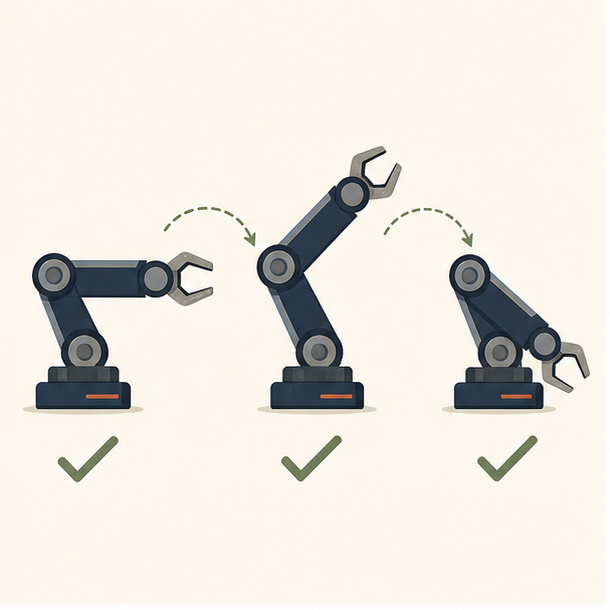
| Checkpoint | Evidence | Typical regression |
| Start | Initial position and object identity | Part begins displaced or duplicated |
| Middle | Direction, joint order, and contact | Motion reverses or geometry bends |
| End | Completed state and response | Result appears without the required action |
The middle checkpoint matters most. Start and end states can match while the path between them becomes physically or logically different. Capture the frame where a joint bears weight, a hand grips an object, or a rotating label passes a clear orientation mark.
Keep a normal-speed reference as well. Three stills reveal state drift, but they do not prove smooth acceleration or continuous contact. The regression test combines checkpoint comparison with one uninterrupted playback of the motion.
Add one crop reference showing the entire motion envelope. A close checkpoint may preserve the joint but hide that the arm travels beyond a safety boundary or leaves the frame. The wide reference is not a fourth state; it is a spatial control that keeps a successful detail comparison from concealing a larger path change.
If motion contains a loop, capture the seam as part of the end checkpoint. The last position should connect naturally to the first, with the same direction and object identity. A candidate can pass all three interior states and still produce a visible jump when repeated on a product page or display.
Generate One Change and Classify the Drift
AIVideoEditor.me describes a prompt-editing workflow based on uploaded footage and a written change request. Its current guidance advises specifying what should remain consistent and avoids promising frame-perfect results. That is a suitable setup for a regression test because the requested treatment and protected motion can be stated separately.
A bounded instruction could be: “Change the scene to a clean technical illustration style while preserving the robotic arm’s shape, clockwise movement, joint sequence, pickup contact, and final placement.” Do not add a camera move or timing change unless those are part of the test. One change makes the resulting drift easier to classify.
Use a video editor AI to create the candidate, then compare the three checkpoints in order. Mark each invariant pass, fail, or unclear. An unclear result is not a pass. Return to the moving clip and determine whether the ambiguity comes from motion blur, a blocked view, or a genuine state change.
Classify failures as identity drift, geometry drift, direction drift, timing drift, or contact drift. The category suggests the next action. A single background object appearing is different from the arm reversing. Both are collateral changes, but only one destroys the demonstration’s central claim.
Also compare duration and crop. A candidate that shortens the segment may omit a checkpoint rather than transform it. A tighter crop may hide the contact point needed to judge the action. These are delivery changes and should be logged even if the motion inside the visible area looks stable.
Run the classification without the original style prompt visible during the first pass. Reviewers should see motion evidence before they are reminded what the candidate was intended to achieve. Then reveal the prompt and judge the requested treatment separately. This order reduces the chance that a successful aesthetic change excuses a motion failure.
For screen recordings or interface demonstrations, protect cursor position, control state, and resulting interface state rather than purely physical geometry. A generated highlight or altered label can make the flow appear easier while changing what a user would actually encounter. Keep verified interface text in the source or add it through conventional overlays.
Apply One Focused Repair and Stop
Allow one repair when the requested style passes and only one invariant has a clear, local failure. Restate that invariant and keep every previously passing detail in the instruction. Then run the same three checkpoints again. Do not invent a new test for the second result.
Reject the direction if the repair breaks a different invariant or if two motion categories fail. A longer prompt may push the error elsewhere without making control more reliable. Returning to the source, narrowing the treatment, or using conventional compositing is a valid engineering decision.
Document why the repair stopped. “Direction drift remained at the middle checkpoint” is actionable. “The AI result looked odd” is not. A specific failure can inform the next source selection or treatment choice without implying that AIVideoEditor.me will behave identically on unrelated footage.
When teams edit videos online, store the source, exact prompt, candidate, checkpoint images, and verdict together. AIVideoEditor.me can reduce the effort required to produce a style option, but the regression fixture is what makes approval repeatable.
Finish with one line per invariant and one overall disposition: accept, repair once, or reject. The winning candidate is not simply the one with the strongest look. It is the version that delivers the requested treatment while the start, path, and end of the motion still tell the same technical story.
Keep the checkpoint set when the clip is localized, cropped, or placed in a new layout. A delivery change can reintroduce a hidden contact or truncated path even after the style candidate passed. Re-running the same fixture gives later editors a stable review method rather than a memory of what the original motion seemed to do.
